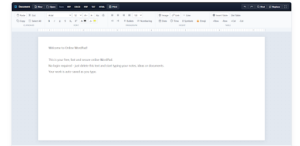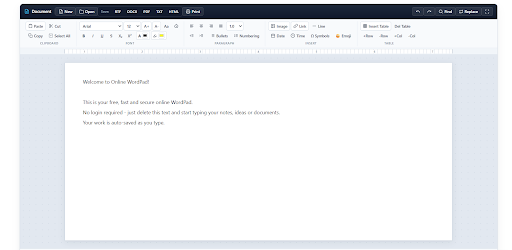
I have tried every writing app out there. Most of them slowed me down. Wordpad is the one I keep coming back to because it does not get in the way. You open it, you write, you save. That is the whole process.
Why I Quit Fancy Editors
A few years ago my laptop had Word, Docs, Notion, and three other apps. I thought more features meant better writing. It did not.
Every time I wanted to write a simple letter, I had to pick a template, wait for sync, and fight with formatting. I spent more time fixing the page than writing the words.
So I went back to simple. One blank page. No sidebar. No suggestions popping up. My writing got faster the same week.
That is what most people actually need. Not more tools. Fewer distractions.
What Makes Wordpad Different
Wordpad does not try to be smart. It does not try to guess what you want to write. It does not save your work to five places at once.
It gives you a page and basic tools. Bold, size, alignment, lists. That is enough for 90 percent of daily writing.
The difference is mental. When the screen is clean, your brain stays on the sentence. When the screen is full of buttons, your brain starts clicking.
Writers who write a lot know this. Simple tools keep you writing. Fancy tools keep you busy.
Documents You Can Finish Today
You can finish real work in Wordpad, not just notes.
A job application that you need to send tonight. A complaint letter to your bank. A leave application for your manager. A rental agreement draft. A simple invoice for a customer. A school assignment that is due tomorrow.
Last week my cousin needed a cover letter. He opened Word, got stuck on templates for 20 minutes. I told him to open Wordpad. He wrote it in 15 minutes and sent it as PDF. Done.
Most daily documents are like that. They do not need design. They need clear words and a clean layout.
How to Write Faster
Speed is not about typing fast. It is about not stopping.
I write the full draft first. I do not fix spelling in the middle. I do not change fonts while I am thinking. I just get the words down.
Once the draft is done, then I fix it. I make the heading bold. I break long paragraphs. I check spelling once. Then I save.
This two step method works better in Wordpad because there is nothing to distract you in step one. No grammar popup, no template suggestion. Just you and the page.
If you follow this, even a one page letter takes less than 10 minutes.
Wordpad for Job Seekers
Job seekers waste a lot of time on formatting.
They download a fancy resume template, then spend two hours fixing it. The content is still weak.
In Wordpad, you cannot hide behind design. You have to write strong lines. Your name, your experience, your skills. In simple format.
Write your resume draft in Wordpad first. Get the words right. Then if you want, paste it into a designed template later. But most employers prefer a simple, clean resume anyway. It is easy to read and easy to print.
For cover letters, Wordpad is even better. Three paragraphs. Why you want the job. What you can do. How to contact you. Save as PDF and send.
Wordpad for Shop Owners
Shop owners do not have time for software.
They need a price list. A notice for staff. A letter to a supplier. A receipt format they can reuse.
I know a shop owner who keeps his daily rates in Wordpad. He opens it in the morning, updates prices, prints it, and puts it on the counter. No account, no app, no training needed.
That is the real use of Wordpad. Not for big companies. For normal people who need to get work done fast.
Wordpad for Teachers and Parents
Teachers use it for worksheets, notices, and test papers. Parents use it for applications to school, permission letters, and fee requests.
A parent does not need to learn Word to write a two line application to a principal. They need a page where they can type and print.
Wordpad is also good for kids. No confusing menus. No chance to accidentally delete a whole project because of some cloud setting. Just type and save.
What Wordpad Will Not Do
Let me be honest. Wordpad has limits.
It will not make a beautiful brochure. It will not handle a 100 page report with images and tables. It will not let five people edit at the same time.
If you need that, use Word or Docs. No shame in that.
But do not use a heavy tool for light work. That is like using a truck to buy milk. Wordpad is for the daily stuff. Use the right tool for the right job.
Keep Your Files Organized
One mistake people make is saving everything as Document 1, Document 2.
Name your file properly before you download. For example, Leave Application March. Resume Ahmed. Price List April.
Make one folder on your computer called Wordpad Files. Save everything there. When you need an old letter, you will find it in seconds.
Do not keep 20 tabs open. Write, save, close. Your computer will stay fast and your mind will stay clear.
FAQs
Can I use Wordpad for my resume?
Yes. Write a clean, simple resume in Wordpad and save it as PDF. It looks professional and prints well.
Does Wordpad save my work automatically?
You should download your file yourself before closing. Do not rely on the tab staying open. Save it to your device.
Can I print directly from Wordpad?
Yes. Save as PDF first, then print the PDF. Your formatting will stay exactly the same.
Can I use Wordpad without internet?
You need internet to open it because it runs in the browser. After that, you can type and download normally.
Is Wordpad good for kids and beginners?
Yes. It is the easiest editor to learn. No account, no complex menus, just typing.
Simple Writing Still Wins
Writing was never supposed to be complicated. You think, you write, you share.
Wordpad keeps it that way. No learning, no waiting, no extra steps.
If you write every day, make it your first choice for quick work. Keep it bookmarked. When you need to write something, open it and finish it.