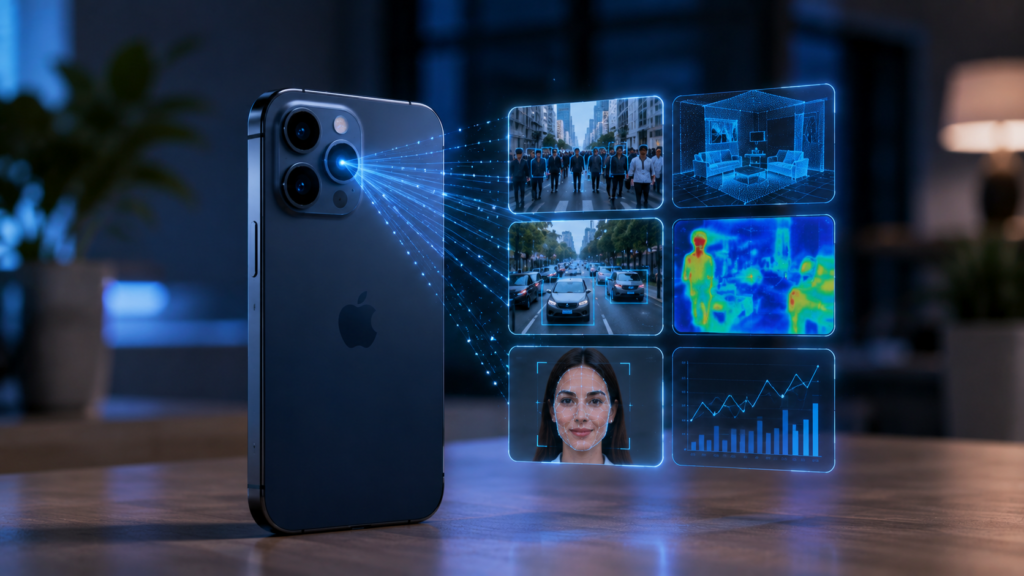
A smartphone camera is no longer just a tool for taking photos and recording videos. Today, iOS App Developers are using live camera feeds as a source of data that artificial intelligence can interpret, classify, and act on in real time. With Apple’s Vision, Core ML, and AVFoundation frameworks, camera-based apps can recognize objects, read text, identify barcodes, understand body poses, and deliver useful insights directly on the device.
This shift is creating new opportunities across retail, healthcare, education, logistics, manufacturing, accessibility, and consumer applications.
From Camera Feed to AI Insight
The basic process may look simple, but several technologies work together behind the scenes.
First, AVFoundation captures live video frames through AVCaptureVideoDataOutput. Developers can access individual frames and send them to computer vision or machine learning pipelines for analysis.
Next, Apple’s Vision framework analyzes the visual information. Vision supports capabilities such as text recognition, object detection, barcode and QR-code detection, face analysis, image classification, and body-pose tracking.
For more specialized intelligence, developers can integrate Core ML models. Core ML allows applications to use trained machine learning models for tasks such as image classification and custom object detection while taking advantage of device hardware including the CPU, GPU, and Neural Engine.
The result is a pipeline that can transform:
Camera frame → Visual analysis → AI prediction → Context → Real-time user action
That final step is what makes camera AI valuable. The application does not simply recognize something; it uses the recognition to provide a useful response.
1: Real-Time Object Recognition
One of the most practical applications is identifying objects while the camera is running.
For example, a retail application could recognize products on a shelf and display product information. A warehouse application could identify packages or equipment. A maintenance application could recognize components and guide technicians through an inspection process.
Vision provides built-in computer vision capabilities, while Core ML can support custom models trained for specific business requirements.
2: Turning Images Into Searchable Information
Camera AI can also convert visual information into structured data.
Using Vision, an iOS application can recognize text in images. Apple documents support for multilingual text recognition and both real-time and offline use cases, with processing performed on the device.
This enables applications such as:
- Document scanning
- Receipt and invoice extraction
- Business-card recognition
- Product-label reading
- Number and code detection
- Accessibility tools
- Educational scanning applications
Vision can also detect barcodes and QR codes, making the camera useful for inventory, payments, authentication, and information retrieval workflows.
3: AI-Powered Visual Assistance
Real-time camera intelligence can make applications more helpful by understanding what is happening around the user.
Consider an app that detects a document and automatically identifies its boundaries. Another app could recognize a person’s pose and provide feedback during an exercise. Vision supports body-pose tracking for people and animals, which can be used for gesture and action recognition.
The important difference is that the camera becomes an input mechanism for intelligent interaction rather than simply a media-capture feature.
4: Why On-Device AI Matters
One of the biggest advantages of processing camera data on the iPhone is reduced dependence on cloud services.
Core ML is designed for on-device machine learning and can operate without a network connection. Apple notes that on-device processing can improve responsiveness and help keep user data private.
This is particularly important for camera applications because images and video may contain sensitive information.
On-device AI can provide:
- Lower latency
- Better responsiveness
- Offline functionality
- Reduced server dependency
- Greater privacy
- More predictable user experiences
Developers still need to consider device capabilities, model size, memory usage, thermal limits, and battery consumption when designing real-time AI pipelines.
5: Building Efficient Real-Time Camera Pipelines
Real-time AI is not simply about running a model on every available frame.
If an application processes too many high-resolution frames, it can increase CPU/GPU usage and affect battery life. Developers therefore need to balance accuracy, frame rate, resolution, and processing frequency.
Apple’s AVCaptureVideoDataOutput provides controls for video processing, including frame handling and output configuration. Its documentation also highlights the importance of choosing appropriate pixel formats for performance and memory efficiency.
A practical implementation may process selected frames instead of every frame, reduce input resolution when appropriate, and use lightweight models for continuous detection.
6: Combining Vision with Custom Core ML Models
Apple’s built-in Vision capabilities are useful for many common computer vision tasks. However, businesses often need recognition specific to their industry.
For example, a manufacturing company may need to identify a particular component defect. A retail business may want to recognize its own product catalog. A logistics company may need to classify specific package types.
This is where custom Core ML models become valuable. Models can be trained using Create ML or converted from other machine learning frameworks into Core ML-compatible formats.
A strong application architecture can therefore combine:
AVFoundation + Vision + Core ML + Swift UI/business logic
Each component has a specific role, creating a flexible foundation for intelligent camera experiences.
Business Opportunities for Camera-Based AI Apps
The technology can support a wide range of business applications.
Retail: Product recognition, shelf analysis, visual search, and barcode scanning.
Healthcare: Visual documentation, assisted monitoring, and specialized image-analysis workflows, subject to appropriate clinical validation and privacy requirements.
Education: Interactive learning, object identification, document recognition, and visual demonstrations.
Manufacturing: Quality inspection, component identification, and worker-assistance workflows.
Logistics: Package recognition, inventory management, and scanning.
Accessibility: Text recognition, environmental understanding, and visual assistance.
This makes camera intelligence particularly attractive for an iOS App Development Company in India working with businesses that want to turn existing mobile workflows into intelligent experiences.
What Developers Should Consider
Successful camera-AI applications require more than choosing an AI model. Developers should consider:
- Use case definition: Clearly determine what the camera needs to understand.
- Model selection: Choose Vision capabilities or a custom Core ML model based on the task.
- Performance: Optimize frame processing, resolution, and model complexity.
- Privacy: Process sensitive visual information on-device whenever practical.
- User experience: Present AI results quickly and clearly without overwhelming users.
- Testing: Evaluate the model under different lighting, angles, backgrounds, and real-world conditions.
- Fallback behavior: Provide useful behavior when recognition confidence is low.
These considerations help transform a technical demonstration into a reliable production feature.
The Future of Camera Intelligence on iOS
Camera-based AI is moving toward applications that understand context rather than simply recognize individual objects.
Future experiences can combine visual information with text, location, user actions, and other signals to make mobile applications more responsive and personalized. Apple’s developer ecosystem already provides a foundation spanning computer vision, machine learning, and on-device intelligence.
For businesses, the opportunity is significant: instead of treating the camera as a feature, developers can treat it as a continuous source of actionable information.
Conclusion
The combination of AVFoundation, Vision, and Core ML is changing what an iPhone camera can do. iOS App Developers can capture live visual data, analyze it with computer vision, apply specialized machine learning models, and convert the results into immediate actions or recommendations.
The strongest camera-AI applications will not be those that simply recognize more objects. They will be the ones that understand why the visual information matters and use it to solve a real user or business problem.
As on-device AI continues to mature, camera intelligence is likely to become an increasingly important part of modern iOS app development.