Hard-Clashes-vs-1200-627
Each coordination meeting is slowed down by a clash report with thousands of flagged items. Teams spend hours on minor warnings while the issues that stop installation wait their turn. The hard vs soft clash BIM split fixes that by sorting problems by what they break. Workflow conflicts add a third group that only appears once the schedule joins the model. Sorting all three early saves rework later.
Why Clash Reports Pile Up Without Sorting
Coordination works when every system has a route and room around it. A federated model brings all disciplines into one file, and a default test flags everything that touches. The result is one long list with one label. Coordinators then work in the order items appear, not in the order of risk. Knowing the types of clashes in BIM gives them a ranking system instead. A clear BIM Workflow Process starts with that ranking.
Hard Clashes: Two Objects, One Space
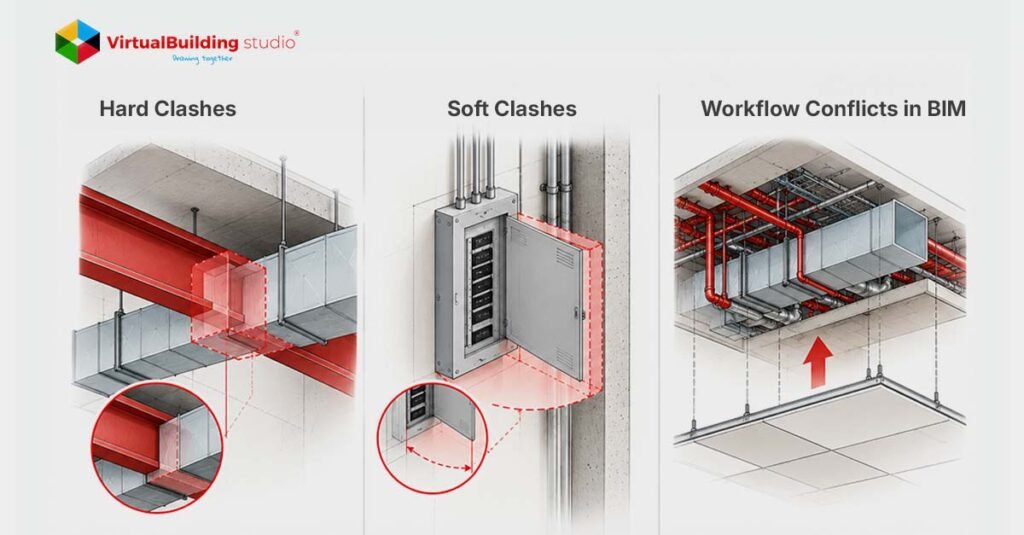
Hard clashes are the easiest group to picture. Two elements occupy the same coordinates, so the installation fails as modeled. Pipe mains cut through steel beams, and conduit racks cross shear walls with no sleeve.
Cost depends on timing. A coordinator fixes a hard clash in the model by changing an elevation, which takes minutes. On site, the same fix can mean core drilling and stopped trades. A study of 19,605 rework events across 346 projects found that rework cut one contractor’s mean yearly profit by 28%.
Teams with MEP BIM Services support model sleeves and offsets before drawings go out. Firms that hire BIM clash detection services USA wide catch the rest while the fix still costs minutes.
Soft Clashes: Nothing Touches, but the Space Is Gone
A model without hard clashes can still fail on site. Hard tests don’t think of working space. Mild collisions break down the defenses of a system, and three reasons appear again and again:
Insulation: Models run pipes at bare size and two inches of insulation closes the gap in the field.
Code zones: NEC 110.26 reserves 30 inches wide and 6.5 feet high in front of equipment up to 600 volts.
Maintenance pull space: Chillers, filter racks, and valves need clear lanes for service years after handover.
Clearance clash detection detects these issues by testing against a keep-out box attached to the equipment. A coordinator sets a tolerance, like 36 inches around a panel, and anything entering that zone gets flagged.
Workflow Conflicts and 4D Timing
Soft clashes check space But space changes As work moves on Workflow problems happen when the schedule interferes with a trade. The model can accept a basement air handler. Walls closing in week 12. Unit arrives week 15. Crew falls down work that is finished.
Navisworks TimeLiner allows teams to tie the model to a schedule to find conflicts in the 4D BIM workflow. Schedule Primavera P6 or MS Project. The sequence is dead-ended before anyone orders any equipment. Same technique shows blocked crane pick paths. So the model is given shoring, scaffolding and laydown areas to provide the test something to grab on to.
Tolerance Settings That Cut False Positives
The default test treats each pair of objects equally, so the noise returns. Two settings will fix most of it:
Clearance tolerances: Use clearance clash detection with a distance value instead of a Hard test for service envelopes.
Same-system rules: Skip pairs from one Revit system or spool group, since pipes and fittings touch by design.
What remains is a shorter list of clashes between different systems, which are the ones that cost money. Firms that want this setup handled for them can turn to MEP BIM coordination services USA teams already use.
Which Clashes to Fix First
Once you have a clean list, sequence is important. Begin with fixed structure and gravity fed plumbing, things that can’t move. Next is large ductwork, then pressurized piping. The flexible small conduit is put on last, as it is the easiest to reroute.
4D BIM workflow conflicts need a schedule review alongside, since a clean model can still carry a sequence problem. Each of the types of clashes in BIM gets its own owner and its own test. That habit keeps the BIM Workflow Process moving.
What to Look for in a Coordination Partner
Teams comparing BIM clash detection services USA firms offer should ask for proof of process, not promises. Strong MEP BIM Services keep the model ready for coordination from the start:
- Insulated pipe sizes and keep-out boxes in equipment families
- Modeled sleeves and openings at structural crossings
- Navisworks tests set up by clash type, not one default run
- Schedule-linked reviews for sequencing
Ask any provider to show these items in a sample report before signing.
Conclusion
Sorting clashes by what they break turns a long report into a short action list. The hard vs soft clash BIM approach separates geometric problems from operational ones, and workflow checks cover timing. Teams that test each group the right way fix problems in the model, not on site. MEP BIM coordination services USA teams rely on apply this sorting from day one.
Get the tolerance settings and cost matrix for all three clash types. → Read the complete blog