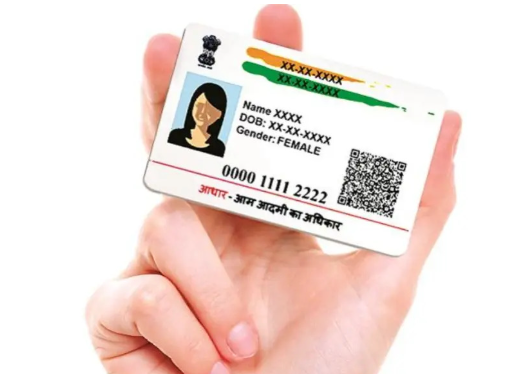
The Aadhar card has become an essential document for every Indian citizen, serving as proof of identity and address. In 2026, with the advancements in technology and the growing trend of digital services, requesting a PVC Aadhar card online has become a seamless process. This guide will walk you through the step-by-step method of ordering your PVC Aadhar card online, while also touching on aspects of Aadhar card download online for those looking to secure their documentation efficiently.
What is a PVC Aadhar Card?
Before diving into the ordering process, it’s essential to understand what a PVC Aadhar card is. The PVC (Polyvinyl Chloride) Aadhar card is a more durable and convenient form of the traditional Aadhar card. It comes in a credit card format, which is not only convenient to carry but also resistant to wear and tear. The PVC Aadhar card is embedded with advanced security features, including a QR code and microtext, ensuring that your personal information remains secure.
Why Order a PVC Aadhar Card?
- Durable Material: PVC cards are weatherproof and less prone to damage compared to paper Aadhar cards.
- Portability: The card is easy to carry in wallets, making it convenient for daily use.
- Enhanced Security: With features like a QR code, your information is more secure.
Step 1: Visit the Official UIDAI Website
To order a PVC Aadhar card online, start by visiting the official website of the Unique Identification Authority of India (UIDAI). This is crucial as it ensures that you are accessing a legitimate service. If you are looking for how to order pvc aadhar card, this is the first and most important step in the process.
Website Link
UIDAI Official Website
Step 2: Navigate to the Aadhar Services Section
Once on the UIDAI homepage, look for the ‘Aadhar Services’ section. This section consists of all Aadhar-related services, including the option to order a PVC Aadhar card.
Step 3: Click on ‘Order Aadhar PVC Card’
In the Aadhar Services section, locate the option that says “Order Aadhar PVC Card.” Click on it to proceed.
Step 4: Enter Your Aadhar Number
You will be directed to a new page where you need to enter your 12-digit Aadhar number. Ensure that you input it correctly to avoid any errors in processing your request.
Alternative Options
If you do not have your Aadhar number, you can also use your registered mobile number to receive an OTP for verification purposes.
Step 5: Authenticate Your Identity
After entering your Aadhar number, you must authenticate your identity. This typically involves entering an OTP (One-Time Password) sent to your registered mobile number. Make sure your mobile number is active and accessible as you’ll need to retrieve this OTP.
Step 6: Confirm Your Details
Once authenticated, you will be shown a preview of your Aadhar details. Review this information thoroughly to ensure everything is correct. Any discrepancies can lead to delays in processing your PVC Aadhar card.
Step 7: Make the Payment
After confirming your details, you will be prompted to make the payment for the PVC Aadhar card. The fee for ordering a PVC Aadhar card is usually nominal. Payments can be made through various digital methods, including credit/debit cards, net banking, and UPI. Follow the instructions to complete the payment process.
Step 8: Download Aadhar Acknowledgment Slip
Upon successful payment, you will receive an acknowledgment slip. This slip contains a tracking number that can be used to check the status of your PVC card order. You can choose to download this acknowledgment slip for your records.
Aadhar Card Download Online
If you need a digital copy of your Aadhar card in the meantime, you can utilize the ‘Aadhar Card Download Online‘ option on the UIDAI website. For this, you will need to provide your Aadhar number and authenticate your identity as mentioned in earlier steps.
Step 9: Wait for Delivery
After placing your order, you will receive updates regarding the status of your PVC Aadhar card. The card is typically dispatched to your registered address. Depending on the courier service and your location, this may take anywhere from a few days to a couple of weeks.
Step 10: Receive Your PVC Aadhar Card
Once your PVC Aadhar card arrives, ensure that you inspect it thoroughly. Check for your details and verify that the card has the QR code and other security features. If everything appears correct, your PVC Aadhar card is ready to be used!
Troubleshooting Common Issues
While the process to order your PVC Aadhar card online is straightforward, you may encounter some common issues:
- Problems with OTP: If you do not receive an OTP, ensure your mobile number is registered with your Aadhar. You may need to visit an Aadhar enrollment center to update your mobile number if it’s incorrect.
- Payment Failures: Should your payment fail, verify your bank details and ensure you have stable internet connectivity. Retry the payment after confirming your information.
- Wrong Information: If you notice any incorrect information after receipt of the PVC Aadhar card, contact UIDAI immediately for rectification.
Conclusion
Obtaining a PVC Aadhar card online in 2026 is a simple and user-friendly process, thanks to the UIDAI’s commitment to improving online services. With just a few steps, you can secure this important piece of identification that enhances not only your convenience but also your security. Remember to keep your Aadhar details safe, and don’t hesitate to utilize the Aadhar card download online option whenever you need a digital version. By following this guide and being mindful of the steps, you will have your PVC Aadhar card ordered and delivered in no time, making your daily transactions more efficient and streamlined