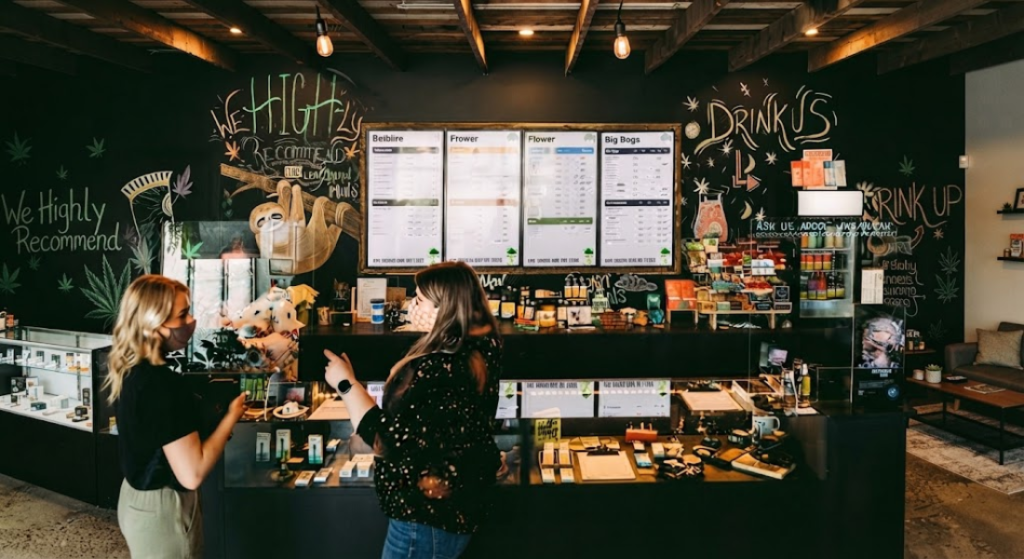
7 Colorful Cannabis Menu
A dispensary menu is more than a list of products and prices. It is one of the first places customers look when they want to compare products, find a category, or learn what a store currently has available. As cannabis retailers continue adopting digital displays, the way menu information is presented has become increasingly important.
A 7 Colorful Cannabis Menu concept can provide inspiration for retailers looking to make their digital displays more visually engaging. Color, layout, typography, imagery, and organization can all influence how customers interact with a menu.
For Canadian dispensaries, however, an effective menu should balance visual appeal with readability, accurate product information, and applicable regulatory requirements. A colorful design should support the information rather than distract from it.
Why Cannabis Menu Design Matters
A well-designed cannabis menu can make it easier for customers to navigate a large product selection.
Dispensaries may carry flower, pre-rolls, edibles, beverages, concentrates, vapes, and other categories. Displaying all of these products without a clear structure can make a menu difficult to scan.
Cannabis Menu Design can address this challenge by creating a consistent visual hierarchy.
For example, category headings can be clearly separated from individual products, while prices and other important details can remain easy to identify.
The design should also consider where the screen is positioned and how far customers will typically stand from it.
1. Use Color to Separate Product Categories
One of the simplest ways to make a digital menu easier to navigate is by using color strategically.
Different colors can help distinguish categories or sections without requiring large amounts of additional text.
For example, a retailer could use one visual treatment for flower and another for beverages. The goal is not to assign as many colors as possible but to create a recognizable structure.
A consistent color system can help customers understand the menu faster.
When developing Colorful Cannabis Menus, retailers should also consider contrast. Text needs to remain readable against its background, particularly when the screen is positioned in a brightly lit retail environment.
2. Create a Strong Featured Product Section
A digital menu can give selected products greater visibility through a dedicated featured section.
This can be useful for introducing new products, highlighting seasonal selections, or presenting products that deserve additional attention.
A featured area should remain visually distinct from the standard product listings while still following the same overall design language.
This approach can be incorporated into both Cannabis TV Menus and traditional digital dispensary displays.
The featured section should contain concise information so customers can understand what is being presented without having to read a large block of text.
3. Use Clear Product Cards
Product cards provide a structured way to organize individual listings.
A card can include the product name, brand, price, package size, and other relevant information.
The same structure can be repeated across different categories.
For a Digital Cannabis Menu, consistent product cards can make it easier for customers to compare several products.
However, retailers should avoid putting too much information into each card. A crowded card can reduce readability and make the entire display feel overwhelming.
The most important details should receive the greatest visual emphasis.
4. Choose Backgrounds That Support Readability
Backgrounds can significantly affect the appearance of a menu.
A colorful background may create visual interest, but it should not compete with product information.
Simple gradients, subtle patterns, solid colors, or carefully selected imagery can provide visual depth while maintaining readability.
For Cannabis TV Menu Ideas, retailers can experiment with different backgrounds while keeping typography and product information consistent.
The best background is usually the one that supports the content rather than becoming the main focus of the screen.
5. Build Menus Around Customer Navigation
A good menu should answer basic customer questions quickly.
Customers should be able to identify:
- What product categories are available
- Which products are listed
- How much products cost
- Which brands are available
- Where additional information can be found
This is especially important for Cannabis Dispensary Menu Boards, where customers may be standing several feet away from the display.
A logical layout can reduce the amount of time customers spend searching for information.
Retailers can organize products by category, product type, brand, or another structure that makes sense for their store.
6. Use Digital Displays for Flexible Updates
One of the major advantages of digital menus is the ability to update content without replacing physical signage.
Inventory can change frequently. Products may sell out, new items can arrive, and prices or product information may need to be updated.
Digital Menu Boards can make these changes easier to manage.
With suitable Cannabis Menu Software, retailers may be able to manage product information, layouts, and displays from a centralized system.
This can be particularly useful for dispensaries with multiple screens.
Digital displays also provide greater flexibility for experimenting with different layouts and menu concepts.
7. Keep Branding Consistent Across the Store
A menu should feel like part of the overall retail environment.
Colors, typography, spacing, and visual elements can be aligned with the store’s branding to create a consistent experience.
This is where Cannabis Marketing Menu design can become particularly useful. A menu should communicate information while fitting naturally into the retailer’s broader visual identity.
Consistency also helps customers recognize the menu structure when they move between different screens.
For example, if every display uses similar category headings and product cards, customers can navigate different screens more comfortably.
Digital Cannabis Menu Boards for Modern Dispensaries
A digital menu can provide more flexibility than traditional printed signage.
Digital Cannabis Menu Boards can display changing product information while allowing retailers to adapt layouts to different screen sizes and store environments.
Some dispensaries may use large landscape displays, while others may use portrait screens or several smaller TVs.
The design should therefore account for screen orientation and viewing distance.
A layout that works well on one screen may need adjustments on another.
The Role of Dispensary TV Menus
Dispensary TV Menus are increasingly useful for stores that want to display product information across customer-facing screens.
TV-based displays can provide a large viewing area, allowing customers to review categories and products from different positions inside the store.
However, screen size alone does not guarantee an effective menu.
The content needs to remain readable, organized, and appropriately spaced.
A colorful design can attract attention, but the underlying information structure should remain the priority.
Considering Cannabis Digital Signage Compliance
Visual design should always be considered alongside applicable cannabis regulations.
When creating Cannabis Digital Signage, retailers should review current requirements regarding advertising, product claims, imagery, promotional content, and other customer-facing information.
Canadian regulations can differ by jurisdiction, so businesses should verify the rules that apply to their location.
Digital technology can make it easier to update content when necessary, but retailers remain responsible for reviewing what appears on their screens.
How BudSense Supports Digital Menu Management
BudSense provides digital, print, and web menu solutions designed for cannabis retailers.
Its technology supports product management, POS synchronization, customizable displays, and other menu-management functions.
Retailers can visit the BudSense website or review the 7 Colorful Cannabis Menu Ideas resource for additional information.
For Canadian dispensaries, using different visual approaches can help create a menu that fits the store’s environment while keeping product information organized.
Conclusion
A 7 Colorful Cannabis Menu concept can give dispensaries useful ideas for improving the appearance and organization of their digital displays.
Color can help separate categories, featured sections can give selected products greater visibility, and consistent product cards can make information easier to scan. At the same time, digital menu technology allows retailers to update information as inventory changes.
The most effective Cannabis Menu Ideas balance visual design with practical information. A colorful display should attract attention without making prices, product names, categories, or other important details difficult to read.
For Canadian cannabis retailers, combining thoughtful design with reliable digital menu technology can create a more organized customer-facing experience while making menu management easier for staff.
Frequently Asked Questions
1. What is a 7 Colorful Cannabis Menu?
A 7 Colorful Cannabis Menu refers to a collection of seven visually engaging menu concepts that can inspire dispensaries when designing digital cannabis displays.
2. Why use color in a cannabis menu?
Color can help separate categories, establish visual hierarchy, and make different sections easier to identify. It should always be used in a way that preserves readability.
3. What should a digital cannabis menu display?
A digital menu can include product names, brands, prices, categories, package information, and other relevant details that customers need to navigate the available selection.
4. Can colorful menus work on dispensary TVs?
Yes. Colorful designs can work well on TV-based displays when they use sufficient contrast, readable typography, and a clear information hierarchy.
5. Do digital cannabis menus need to follow regulations?
Yes. Digital menus are customer-facing displays and may be subject to applicable cannabis advertising and retail requirements. Retailers should verify current regulations for their jurisdiction.