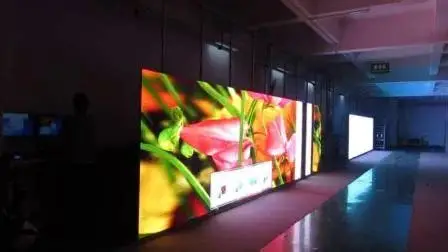
 Indoor LED displays have become an effective way for businesses to attract attention, communicate information, promote products, and create memorable customer experiences. Retail stores, shopping malls, restaurants, hotels, corporate offices, educational institutions, and entertainment venues are increasingly using LED technology for indoor communication and advertising.
However, choosing the right display requires more than comparing screen sizes and prices. Pixel pitch, viewing distance, brightness, resolution, content requirements, installation, maintenance, and budget all influence whether an LED display will deliver the expected results.
This guide explains the most important factors to consider when choosing an indoor LED display for your business.
1. Define the Purpose of the Display
Start by determining what you want the LED display to accomplish.
Different businesses use indoor LED displays for different purposes, including:
Advertising and promotions
Product demonstrations
Brand communication
Digital menus
Corporate presentations
Event backgrounds
Customer information
Wayfinding
Entertainment
Social media content
For example, a retail store may prioritize vibrant promotional content, while a corporate office may need a high-resolution display for presentations and video conferencing.
Understanding the purpose will help you select the appropriate specifications.
2. Choose the Appropriate Screen Size
Screen size should be determined by the available space and the viewing distance.
A display that is too small may fail to attract attention, while an unnecessarily large screen can increase costs without providing meaningful benefits.
Consider:
Available wall or floor space
Viewing distance
Number of viewers
Installation location
Content type
Desired visual impact
Measure the installation area carefully before selecting the screen dimensions.
3. Understand Pixel Pitch
Pixel pitch is one of the most important specifications when selecting an LED display.
It refers to the distance between the centers of two adjacent LED pixels. A smaller pixel pitch generally provides greater image detail and is more suitable for applications where viewers are close to the screen.
For example:
Fine pixel pitch: Suitable for close viewing and detailed content
Medium pixel pitch: Suitable for general indoor advertising
Larger pixel pitch: Suitable for displays viewed from greater distances
The right choice depends primarily on viewing distance rather than simply selecting the smallest pixel pitch available.
4. Consider Viewing Distance
Viewing distance should be considered together with pixel pitch.
If customers will stand only a few meters from the display, a finer pixel pitch can provide a smoother and more detailed image.
For large screens positioned farther away, a larger pixel pitch may be sufficient.
A professional supplier should evaluate the location and recommend a suitable specification instead of offering the same solution for every project.
5. Evaluate Image Quality
Image quality is especially important for indoor LED displays because viewers are often relatively close to the screen.
Look at specifications such as:
Resolution
Pixel pitch
Color reproduction
Contrast
Refresh rate
Grayscale performance
Image processing
High-quality visuals can make advertisements, product videos, presentations, and branding content appear more professional.
6. Check the Refresh Rate
Refresh rate refers to how frequently the display updates its image.
A higher refresh rate can produce smoother video and reduce visible flickering, particularly when the display is recorded using cameras or smartphones.
If your business plans to use the display for video content, events, live broadcasts, or social media production, refresh rate should be an important consideration.
7. Consider Brightness
Indoor LED displays do not normally require the extremely high brightness levels used by outdoor screens.
Excessive brightness can create glare and make viewing uncomfortable.
The appropriate brightness depends on the environment.
For example:
A dim event venue may require lower brightness.
A brightly lit shopping mall may require higher brightness.
A retail store with strong interior lighting may need a carefully calibrated display.
A good supplier should recommend brightness based on the actual lighting conditions of the installation area.
8. Look at the Viewing Angle
A wide viewing angle allows people to see the content clearly from different positions.
This can be important in:
Shopping malls
Retail stores
Restaurants
Reception areas
Exhibition halls
Corporate environments
If customers will approach the screen from multiple directions, choose a display that maintains good image quality across a wide viewing area.
9. Consider the Content You Will Display
The type of content you plan to show should influence your display choice.
For example, a business displaying simple promotional graphics may have different requirements from a company showing detailed product videos.
Consider whether you will display:
Images
Advertisements
Promotional videos
Presentations
Live video
Social media content
Digital menus
Animations
Product demonstrations
Make sure the display and control system support the required content formats.
10. Choose a Reliable Control System
An LED display requires a control system to process and deliver content to the screen.
Depending on your requirements, you may need:
Media players
Sending cards
Receiving cards
Video processors
Content management software
Network connectivity
For businesses managing several displays, centralized content management can make updating and scheduling content significantly easier.
11. Consider Remote Content Management
Remote management is particularly valuable for businesses with multiple locations.
A cloud-based digital signage system can allow authorized staff to update content without physically visiting every screen.
For example, a company with stores in Kuala Lumpur, Penang, Johor, and other locations could manage promotional campaigns from one centralized platform.
Useful features may include:
Remote updates
Content scheduling
Playlist management
Multi-screen control
User permissions
Screen monitoring
This can save time and make content management more efficient.
12. Evaluate Installation Requirements
Installation is an important part of an indoor LED display project.
Before purchasing, determine:
Where the screen will be mounted
Whether wall mounting is possible
Whether a supporting structure is required
Where electrical connections will be located
How cables will be managed
How technicians will access the display
Whether ventilation is adequate
A professional site assessment can identify potential installation issues before the project begins.
13. Think About Maintenance
Like any electronic equipment, LED displays require appropriate maintenance.
Ask the supplier about:
Cleaning
Module replacement
Power supply replacement
Technical support
Software updates
Preventive maintenance
Troubleshooting
Modular LED displays can make maintenance easier because individual modules or components can often be replaced without replacing the entire screen.
14. Check Warranty Coverage
Warranty protection is an important consideration when making a significant technology investment.
Before purchasing, ask:
How long is the warranty?
Which components are covered?
Does it include labor?
Is onsite support available?
How are defective modules handled?
What situations are excluded?
Always request warranty terms in writing.
15. Compare Energy Consumption
Although LED technology can be energy-efficient, electricity consumption should still be considered when comparing large displays.
Ask about:
Maximum power consumption
Average power consumption
Brightness management
Automatic power scheduling
Energy-saving features
If the display will operate for many hours every day, energy efficiency can have a meaningful impact on long-term operating costs.
16. Consider the Design of Your Business Environment
An LED display should complement the surrounding environment.
For a premium retail store, a sleek and high-resolution display may be appropriate. A restaurant may prefer a creative video wall, while a corporate office might require a clean and professional installation.
Consider:
Screen dimensions
Cabinet design
Mounting method
Bezel appearance
Surrounding materials
Brand colors
Interior architecture
Good integration can make the display feel like a natural part of the business environment.
17. Choose a Display That Can Scale
Think about your future requirements before making a purchase.
Your business may eventually need additional screens or displays in other locations.
A scalable system can make future expansion easier by supporting:
Multiple displays
Centralized management
Additional media players
Larger content networks
Multiple branches
Planning ahead can reduce the need to replace your system later.
18. Compare Total Cost Instead of Initial Price
Price is important, but it should not be the only deciding factor.
The total cost of ownership can include:
Purchase price + installation + software + electricity + maintenance + repairs + replacement components
A cheaper display may have lower-quality components or limited support, potentially resulting in higher costs over time.
When comparing suppliers, make sure quotations include similar specifications and services.
19. Evaluate the Supplier’s Experience
The quality of the supplier is just as important as the quality of the display.
Before choosing a provider, review:
Previous projects
Customer reviews
Industry experience
Installation capabilities
Technical expertise
Warranty services
Maintenance support
Ask to see examples of installations similar to your project.
A supplier with experience in indoor LED projects can help you avoid common mistakes involving pixel pitch, brightness, installation, and content management.
20. Request a Detailed Quotation
A professional quotation should clearly explain what you are purchasing.
The quotation should ideally include:
Category Details to Check
Screen Size, pixel pitch, resolution
Brightness Recommended brightness level
Components LED modules, cabinets and power supplies
Control system Hardware and software
Installation Mounting, configuration and testing
Software Features and licensing
Warranty Duration and coverage
Maintenance Support and service options
Timeline Delivery and installation schedule
Payment Payment terms
Avoid quotations that provide only a general description such as “LED screen” without detailed specifications.
Common Mistakes to Avoid
Choosing the Cheapest Display
The lowest price does not necessarily represent the best value. Poor-quality components can result in image problems and higher maintenance costs.
Selecting Pixel Pitch Without Considering Distance
Pixel pitch should be selected according to how close viewers will be to the display.
Using Excessive Brightness
A very bright screen is not always better indoors. Excessive brightness can cause glare and reduce viewing comfort.
Ignoring Content Management
If your business needs frequent content updates, choose a system that makes content management simple.
Forgetting Maintenance
Ask about technical support and spare parts before making your purchase.
Buying Without a Site Assessment
The physical environment can significantly affect screen size, mounting, brightness, and electrical requirements.
Final Thoughts
Choosing the right indoor LED display requires careful consideration of both technical specifications and business objectives. Screen size, pixel pitch, viewing distance, brightness, refresh rate, image quality, content management, installation, maintenance, and warranty should all be evaluated before making a decision.
The best display is not necessarily the largest or most expensive option. It is the one that provides the right balance between visual quality, functionality, reliability, operating cost, and long-term value.
By clearly defining your requirements and working with an experienced LED signage provider, you can select an indoor LED display that enhances your business environment, attracts customer attention, and supports your marketing goals for years to come.