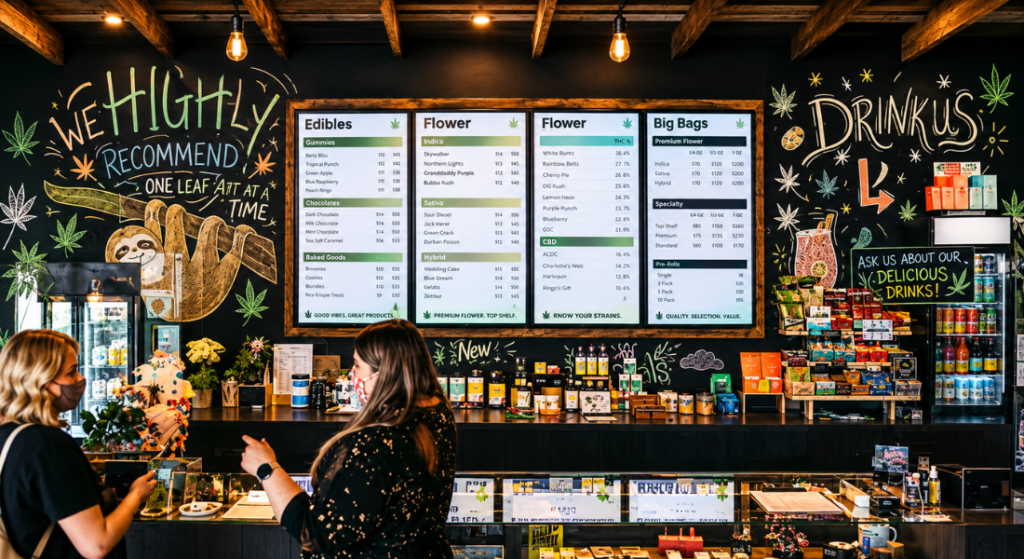
Digital Cannabis Menus Boards
Canadian cannabis dispensaries offer everything from flower to pre-rolls, edibles, beverages, oils, and topicals. Having so many products available means customers should have an easy way to find what they are looking for and review important product information before speaking with staff.
Digital Cannabis Menus Boards can allow dispensaries to organize product info while also giving customers an easy way to browse what products are available. Instead of scrolling through long lists or asking staff members about every minor detail, customers can look up products, categories, pricing, and other info on digital displays.
What Are Digital Cannabis Menus Boards?
Digital Cannabis Menus Boards are digital displays cannabis retailers can use to show product information. Some dispensaries may use one screen, while other retailers might have several screens throughout their store.
Dispensaries can show product name, producer, size, price, THC%, CBD%, description, and additional details on a Digital Cannabis Menu. Products can also be sorted by category, such as flower, pre-rolls, edibles, oils, beverages, and topicals.
Dividing products into categories can help customers browse through products more efficiently.
Making Product Categories Easier to Find
Sorting products makes it easier for customers to find what they want. Let’s say a customer is looking to buy some flower. They might not want to search through every edible or beverage to find different strains.
By separating products into categories with Digital Dispensary Menu Boards, dispensaries allow customers to focus on what they are interested in.
Additionally, Digital Cannabis Menu Boards can be arranged by group of products or featured products. This provides retailers flexibility when deciding what info should be shown on their menus.
Providing Important Product Information
Most customers will want to know certain details before they decide on purchasing a product. A Digital Cannabis Menu can provide customers with basic product information in a way that’s easy to read.
Product name, producer, size, price, THC%, CBD%, and description are just a few examples of information that can be displayed on Digital Menus.
It’s important to not overcrowd menus with too much text. Cannabis menus should be organized and easy to browse. If there’s too much information on one screen, customers may have a hard time finding what they’re looking for.
Keeping Digital Menus Updated
Inventory will change at cannabis dispensaries. Products may sell out, dispensaries may receive new products, and pricing/product details may need to be updated.
While printed menus can work, any changes would have to be made by hand. Digital Cannabis Menus allow dispensaries to update what’s shown on their screens at any time without needing to reprint menus.
Digital Cannabis Menus can benefit large dispensaries with extensive product selections or retailers who constantly rotate inventory.
Managing Products With Cannabis Menu Software
Once menus start to expand, updating a few digital displays by hand can take a while. Cannabis Menu Software can give retailers the ability to manage product information through a centralized system.
Dispensaries can input product info into Cannabis Dispensary Menu Software then use that info to power their digital menus. Depending on the software, dispensaries may be able to integrate their digital menus with a point-of-sale (POS) system.
Software allows multiple employees to access the same menu data. This can help ensure employees are providing customers with up-to-date info across all Digital Menu Boards.
Using Cannabis Digital Signage
Cannabis Digital Signage is not limited to displaying lists of products. Cannabis Digital Signage can be used to feature new products, categories, dealers, or anything else retailers want to share with customers.
For example, a dispensary may have one screen dedicated to displaying its main menu. Meanwhile, another screen can utilize cannabis digital signage to highlight new products.
With cannabis digital signage, retailers can showcase different content throughout their store and make use of all their digital screens.
Digital Cannabis Signage can also be used alongside a cannabis digital menu to provide customers with additional product information.
Digital Dispensary TV Menus for Easy Viewing
Alternatively, some dispensaries use larger TV style screens to allow their menus to be visible from anywhere in the store. Digital dispensary TV menus allow dispensaries to display product categories and info on larger screens.
The orientation of screens can also play a factor. Cannabis menus can be displayed on screens using either landscape or portrait menu board layouts.
Every dispensary is different and will have their own needs when it comes to displaying digital menus. Factors such as available wall space, product count, screen size, and how much info should be displayed will determine the right setup.
Helping Customers While Supporting Staff
One of the biggest benefits of Cannabis Dispensary Menus is giving customers access to product info before they speak to a budtender.
Some customers may know exactly what they want, while other customers may have questions. Cannabis dispensary menus allow customers to check product information without having to ask an employee.
Digital menus can also support employees. Many questions customers have can be answered by simply looking at the dispensary’s digital menu. This allows staff to focus more on customers’ questions that require detailed answers.
Menus are there to support employees, not replace them. By providing customers with easy access to product info, dispensaries support their employees while helping customers.
Choosing the Right Dispensary Menu Boards
Every cannabis retailer is different and has unique needs. Keep the following questions in mind to help find the right Dispensary Menu Boards for your business.
How often will your product selection change? How many screens will your store need? What orientation should your displays use? How much info should appear on each screen? Will your menu need integration with your POS system?
Questions like these can help retailers find menus that support their business. BudSense even offers retailers the ability to see how our menus would look in their store using a custom menu builder.
Keep these questions in mind when choosing the right Digital Cannabis Menu Boards for your cannabis dispensary.
BudSense Digital Cannabis Menus
BudSense is a Canadian-based cannabis retail technology brand that offers menu solutions for cannabis retailers. BudSense supports Digital Cannabis Menus, print menus, and web menus.
Like most dispensaries, BudSense customers can add product info such as price, size, THC%, CBD%, and more when creating their menus.
Visit BudSense’s Digital Menus page to learn more about how BudSense can help your business utilize Digital Cannabis Menus.
Visit BudSense’s homepage to learn more about BudSense and our suite of cannabis retail technology solutions.
Conclusion
Digital Cannabis Menus Boards allow dispensaries to show customers important product info while making it easier to browse what products are available. Whether retailers are looking for Digital Cannabis Menus or Digital Dispensary Menus, Cannabis Menu Software, Cannabis Digital Signage, or Digital Menu Boards, there are a variety of ways dispensaries can display their products.
When displayed correctly, menus should be organized, easy to read, and frequently updated. This allows customers to spend less time searching for basic product info and more time talking to cannabis professionals.
FAQs
1. What are Digital Cannabis Menus Boards?
Digital Cannabis Menus Boards are digital displays cannabis dispensaries can use to display products, categories, pricing, THC%, CBD%, descriptions, and more product info.
2. How can Digital Dispensary Menus help customers?
Digital Dispensary Menus allow dispensaries to sort their products into categories and show customers important product details. Having menus allows customers to find products they may be interested in without needing to ask.
3. What is Cannabis Menu Software?
Cannabis Menu Software allows dispensaries to manage their product information from one system. Cannabis Menu Software can be used to create digital menus for dispensaries. (Some menu software can integrate with POS systems)
4. Can cannabis products be sorted by category?
Yes. Cannabis menus can sort products by flower, pre-rolls, edibles, oils, beverages, topicals, and more. Cannabis Menu Boards can help organize these categories for customers.
5. Can dispensaries display THC % and CBD % on digital menus?
Yes. THC% and CBD% can be displayed on Digital Menus along with other product information such as price, size, producer, and description. Digital Dispensary Menus can provide this information to customers in an organized format.