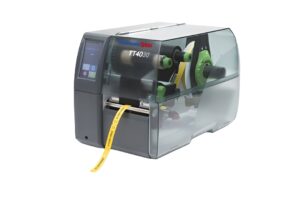
Introduction
A Thermal Transfer Printer is the go to choice when you need labels that stay readable under heat, abrasion, chemicals, and daily handling. In warehouses, labs, maintenance teams, and electronics assembly, durability matters because a failing label can slow picking, break traceability, or create a safety risk. This guide explains how thermal transfer works, what to look for, and how to match a printer to real production and site conditions.
How a Thermal Transfer Printer Works
Thermal transfer printing uses a heated printhead to melt ink from a ribbon onto the label surface. Instead of printing directly on heat sensitive paper, the ribbon acts as the ink source, which is why the output lasts longer.
You typically feed two materials through the printer:
-
Ribbon, the ink layer that transfers onto the label
-
Label media, such as paper, polypropylene, polyester, or specialised films
Because the printhead applies precise heat, you get sharp edges for barcodes, small text, and symbols. That is essential when labels must scan reliably across different angles, lighting, and distances.
Ribbon types and what they change
Ribbon selection decides how tough your print is and what surfaces it bonds to.
-
Wax ribbons suit paper labels and general shipping tasks
-
Wax resin balances durability and cost for broader uses
-
Resin ribbons provide high chemical and abrasion resistance on synthetic labels
If your labels face oils, solvents, or frequent wiping, resin is usually the safer match.
Where Thermal Transfer Labels Add Real Value
Thermal transfer is popular because it supports demanding environments and long service life. It is also flexible across industries and label shapes.
Common use cases include:
-
Asset and inventory tags on electronics, laptops, and tools
-
Cable and wire identification for cables, connectors, and contactors
-
Panel and switch labels for switches, fuses, and safety markings
-
Product labels for components like LEDs, capacitor parts, and controllers
-
Lab and storage labels that face thermal cycles and cleaning chemicals
When traceability matters, print consistency matters too. Clear labels help technicians find the right microcontrollers, microprocessors, or sensors without rechecking paperwork.
Choosing the Right Thermal Transfer Printer for Your Workflow
The best printer is the one that fits your volume, label material, and operating setup. Focus on these decision points.
Print resolution and barcode quality
Resolution is usually 203 dpi, 300 dpi, or 600 dpi. Higher resolution helps when you print tiny text, dense barcodes, or small part numbers.
-
203 dpi works well for standard shipping labels and larger text
-
300 dpi is a strong all round choice for product labels and electronics IDs
-
600 dpi fits micro text, dense QR codes, and very small compliance marks
If you label compact components or tight spaces on cable wraps, higher resolution can reduce scan failures.
Print width and label formats
Match the printer to the widest label you will use, not just today’s common label. Consider:
-
Cable sleeves and wrap around labels
-
Small component labels for bins and reels
-
Safety labels with symbols, warnings, and colour requirements
-
Larger logistics labels for cartons and pallets
A printer that supports your widest format avoids awkward rotations, cropped content, or forced template changes later.
Speed and duty cycle for daily throughput
Print speed matters most when labels are produced in batches. Duty cycle describes how much the printer can output reliably each day.
For high volume operations, look for:
-
Strong media handling and stable ribbon tracking
-
Robust motors and internal frame design
-
Easy access for fast ribbon and roll changes
For occasional label needs, a smaller desktop model can be efficient and space saving.
Media and Adhesive: The Hidden Performance Factor
Many label problems are not printer problems. They come from using the wrong media or adhesive for the surface and environment.
Think through:
-
Surface type: smooth plastic, powder coated metal, or textured panels
-
Exposure: heat, moisture, UV, oils, cleaning agents
-
Handling: rubbing, bending, frequent tool contact, or abrasion
-
Lifespan: short term shipping versus long term asset tracking
For harsh environments, synthetic labels plus resin ribbon often deliver the most reliable result. This is especially useful in maintenance areas with grips, oils, and frequent wipe downs.
Thermal conditions and specialised materials
If labels face elevated temperatures or repeated heat cycles, choose media designed for thermal resistance. In electronics work, thermal pads and nearby heat sources can stress labels, so material choice matters as much as print quality.
Connectivity and Integration in Real Sites
A Thermal Transfer Printer is often part of a larger system that includes label software, scanners, and ERP or warehouse tools. Connectivity choices can simplify deployment and reduce downtime.
Common options include:
-
USB for quick local setup
-
Ethernet for shared printing across teams
-
Wi Fi for flexible placement near workstations
-
Bluetooth for mobile or field labelling
If you label items at the point of use, such as at a bench building electronics assemblies, network printing and consistent templates reduce errors.
Printhead Care and Consumable Management
Thermal transfer printers are reliable, but the printhead is a precision component. Most print quality issues are preventable with routine habits.
Good practices include:
-
Use ribbons and media that match the printer specification
-
Keep the print path clean to avoid dust buildup
-
Reduce adhesive residue with proper cleaning swabs
-
Store ribbons and labels in dry, temperature stable areas
-
Replace worn platen rollers when feeding becomes inconsistent
When labels are used for safety or compliance, consistent quality protects both operations and audit readiness.
Matching Label Content to Operations and Safety
Strong printing is only half the job. Label design should support quick decisions and accurate handling.
For industrial and technical environments, include:
-
Clear text hierarchy for fast reading
-
Adequate quiet zones and contrast for barcodes
-
Symbols and warnings where safety is involved
-
Durable identifiers for electronics, sensors, and controllers
-
Logical naming for parts stored near switches, contactors, and fuses
If teams work across shifts, standard templates reduce variation and prevent relabelling.
Final Thoughts
A Thermal Transfer Printer is a dependable choice when labels must stay legible through handling, heat, and industrial exposure. By selecting the right ribbon, media, and resolution, you can produce durable labels for cables, electronics, tools, and safety marking with consistent scan performance. Focus on the environment first, then match printer capability to volume and label formats, and you will get a setup that supports traceability and smoother daily operations.