mep-clash-detection-matrix-Navisworks
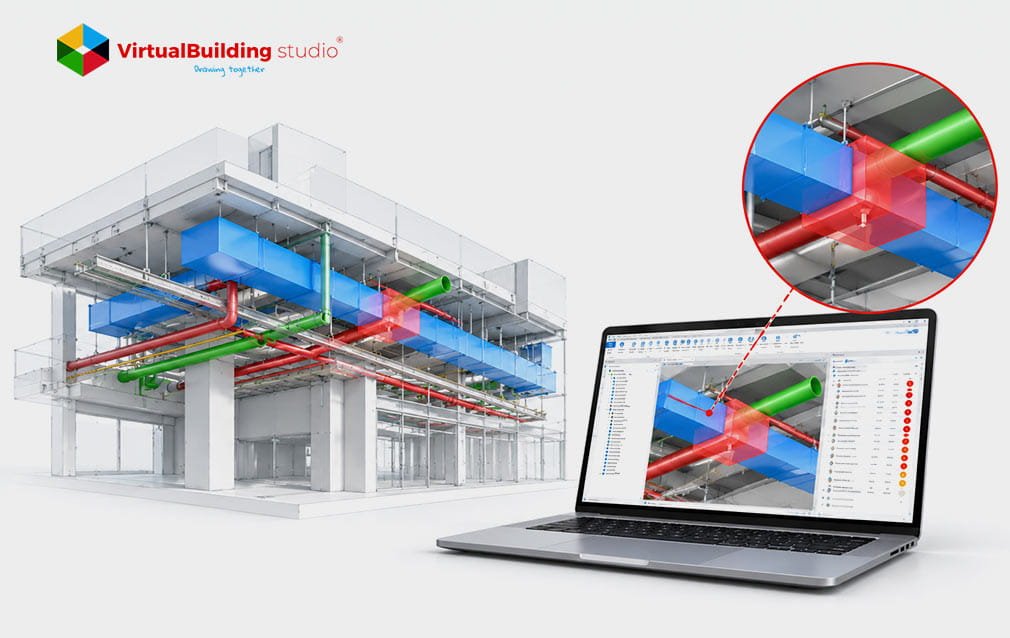
No one looks through a clash report that has thousands of rows. Foremen quickly scan the page shut the file and go back, to the job site. Real conflicts stay buried next to harmless overlaps. The test setup causes this. A blanket Navisworks test compares every model against every other model, so teams receive everything it finds. An MEP clash detection matrix fixes that by deciding upfront which trades get tested, in what order and at what tolerance. Building one starts with understanding why raw results fail.
Why Raw Navisworks Tests Create So Many Junk Clashes
Navisworks’ Clash Detective compares geometry and nothing else, so coordinators must supply the judgment. Three modeling habits make the noise worse:
Placeholder duplicates: Architectural models carry generic fixtures that overlap the subcontractor’s fabrication models.
Insulation: Tests treat jacketing as solid, so pipes with enough room still register clashes.
Missing openings: Early slabs and walls have no cutouts, so every riser reports a conflict.
The cost reaches past the model. A 2018 Autodesk and FMI survey linked 48% of U.S. construction rework to poor project data and miscommunication, about $31.3 billion. That is why a clean Clash Detection Workflow needs rules before the first test runs.
Rank Trades First in Your MEP Clash Detection Matrix
Rules start with a ranking that every trade accepts. The trade that can move least gets the space first. Coordinators record that order in an MEP Coordination Matrix, and it drives every later test. A simple MEP trade priority matrix runs from least to most flexible:
Structure and post-tension slabs: These stay fixed without a structural engineer’s stamped approval.
Gravity plumbing: Drain lines need continuous slope, typically 1/8 to 1/4 inch per foot.
Large HVAC ductwork: Wide trunks need deep ceiling space.
Pressurized pipework: Chilled water, fire protection and domestic lines can offset around obstacles.
Electrical trays and conduit: Branch runs bend in the field, so they move first.
Once the order is set, the next question is how close is too close.
Set Limits with a BIM Clash Tolerance Table
A ranking tells who turn is next. Tolerances tell you when a conflict is worth bringing up. A BIM clash tolerance table gives a single number for each pair of trades to test against. Hard Clashes are real overlaps and Soft Clashes are clearance failures, e.g. a Pipe crowding a Valve Handle. Navisworks names these tests Hard and Clearance. A hard test ignores overlaps smaller than the tolerance. A clearance test reports anything closer than it.
Starting values vary by project, so adjust them to the specification:
Structure vs. primary duct: Hard, 0 mm
Pipe vs. cable tray: Clearance, 50 mm
VAV box access zone: Clearance, 600 to 900 mm
Navisworks also includes an Insulation Thickness rule for clearance tests. Coordinators can apply it to drop pipes that already have room for their jacketing.
Build Search Sets and a Navisworks Clash Matrix Template
A tolerance table does nothing until each row becomes a test, and Search Sets let coordinators build those tests. A Selection Set freezes specific objects, so it breaks when a subcontractor re-exports a model. A Search Set stores a rule, such as Category equals Ducts, and finds new geometry when models update. Base the rules on three Revit properties:
Category: Ducts, Pipes, Cable Trays
System Type: Supply Air, Sanitary, Chilled Water
Reference Level: Level 02, Level 03
Coordinators export the sets and batch tests to XML, then import them on the next project. That shared library works as a reusable Navisworks clash matrix template.
Group Clashes and Track Issues Through BCF
Running tests is the easy part. Triage takes the effort, because single pins overwhelm the foremen who must act on them. Coordinators fix this by combining related pins into one issue:
By run: Eight sprinkler branches crossing one tray become one issue.
By level and grid: Tag each issue with an intersection such as L03_Grid_F4-G5.
By zone: Isolate mechanical rooms so one contractor closes a plant room in one pass.
This is where MEP coordination for contractors pays off, since each foreman sees only their own zone. BCF, the open BIM Collaboration Format, then carries each issue’s 3D view, assignee, due date and status into Revizto, Procore or Autodesk Construction Cloud. Providers of MEP BIM coordination services usually set the due dates at this stage.
When to Bring in Outside Help
Some projects outgrow internal hours. Contractors then hire MEP clash detection services to set up the matrix and handle triage. Others fold this work into wider MEP BIM services that run from modeling through coordination. Either way, ask for proof before signing:
A documented tolerance table
A reusable sear
No one looks through a clash report that has thousands of rows. Foremen quickly scan the page shut the file and go back, to the job site. Real conflicts stay buried next to harmless overlaps. The test setup causes this. A blanket Navisworks test compares every model against every other model, so teams receive everything it finds. An MEP clash detection matrix fixes that by deciding upfront which trades get tested, in what order and at what tolerance. Building one starts with understanding why raw results fail.
Why Raw Navisworks Tests Create So Many Junk Clashes
Navisworks’ Clash Detective compares geometry and nothing else, so coordinators must supply the judgment. Three modeling habits make the noise worse:
Placeholder duplicates: Architectural models carry generic fixtures that overlap the subcontractor’s fabrication models.
Insulation: Tests treat jacketing as solid, so pipes with enough room still register clashes.
Missing openings: Early slabs and walls have no cutouts, so every riser reports a conflict.
The cost reaches past the model. A 2018 Autodesk and FMI survey linked 48% of U.S. construction rework to poor project data and miscommunication, about $31.3 billion. That is why a clean Clash Detection Workflow needs rules before the first test runs.
Rank Trades First in Your MEP Clash Detection Matrix
Rules start with a ranking that every trade accepts. The trade that can move least gets the space first. Coordinators record that order in an MEP Coordination Matrix, and it drives every later test. A simple MEP trade priority matrix runs from least to most flexible:
Structure and post-tension slabs: These stay fixed without a structural engineer’s stamped approval.
Gravity plumbing: Drain lines need continuous slope, typically 1/8 to 1/4 inch per foot.
Large HVAC ductwork: Wide trunks need deep ceiling space.
Pressurized pipework: Chilled water, fire protection and domestic lines can offset around obstacles.
Electrical trays and conduit: Branch runs bend in the field, so they move first.
Once the order is set, the next question is how close is too close.
Set Limits with a BIM Clash Tolerance Table
A ranking tells who turn is next. Tolerances tell you when a conflict is worth bringing up. A BIM clash tolerance table gives a single number for each pair of trades to test against. Hard Clashes are real overlaps and Soft Clashes are clearance failures, e.g. a Pipe crowding a Valve Handle. Navisworks names these tests Hard and Clearance. A hard test ignores overlaps smaller than the tolerance. A clearance test reports anything closer than it.
Starting values vary by project, so adjust them to the specification:
Structure vs. primary duct: Hard, 0 mm
Pipe vs. cable tray: Clearance, 50 mm
VAV box access zone: Clearance, 600 to 900 mm
Navisworks also includes an Insulation Thickness rule for clearance tests. Coordinators can apply it to drop pipes that already have room for their jacketing.
Build Search Sets and a Navisworks Clash Matrix Template
A tolerance table does nothing until each row becomes a test, and Search Sets let coordinators build those tests. A Selection Set freezes specific objects, so it breaks when a subcontractor re-exports a model. A Search Set stores a rule, such as Category equals Ducts, and finds new geometry when models update. Base the rules on three Revit properties:
Category: Ducts, Pipes, Cable Trays
System Type: Supply Air, Sanitary, Chilled Water
Reference Level: Level 02, Level 03
Coordinators export the sets and batch tests to XML, then import them on the next project. That shared library works as a reusable Navisworks clash matrix template.
Group Clashes and Track Issues Through BCF
Running tests is the easy part. Triage takes the effort, because single pins overwhelm the foremen who must act on them. Coordinators fix this by combining related pins into one issue:
By run: Eight sprinkler branches crossing one tray become one issue.
By level and grid: Tag each issue with an intersection such as L03_Grid_F4-G5.
By zone: Isolate mechanical rooms so one contractor closes a plant room in one pass.
This is where MEP coordination for contractors pays off, since each foreman sees only their own zone. BCF, the open BIM Collaboration Format, then carries each issue’s 3D view, assignee, due date and status into Revizto, Procore or Autodesk Construction Cloud. Providers of MEP BIM coordination services usually set the due dates at this stage.
When to Bring in Outside Help
Some projects outgrow internal hours. Contractors then hire MEP clash detection services to set up the matrix and handle triage. Others fold this work into wider MEP BIM services that run from modeling through coordination. Either way, ask for proof before signing:
A documented tolerance table
A reusable search set library
A BCF issue flow with clear due dates
A provider who can show all three has already solved the setup problem.
Conclusion
A matrix turns coordination from cleanup into a planned process. Coordinators rank the trades, set tolerances, build search sets, group results, and track fixes in BCF. Each step removes noise before it reaches the foreman. The full blog includes a free Excel template that packages the whole setup.
ch set library
A BCF issue flow with clear due dates
A provider who can show all three has already solved the setup problem.
Conclusion
A matrix turns coordination from cleanup into a planned process. Coordinators rank the trades, set tolerances, build search sets, group results, and track fixes in BCF. Each step removes noise before it reaches the foreman. The full blog includes a free Excel template that packages the whole setup.