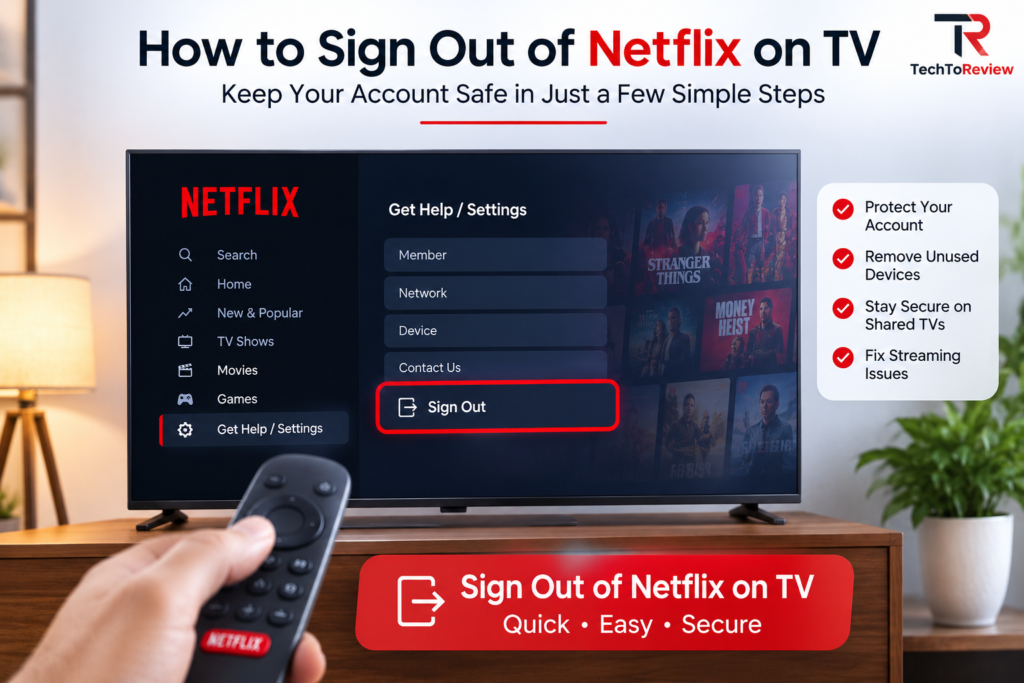
Knowing How to Sign Out of Netflix on TV can be important when you have used your Netflix account on a hotel television, a friend’s smart TV, a rental property, or a device that you no longer own. Leaving your account signed in can allow another person to access your profile and continue using your Netflix account.
Fortunately, the process is usually straightforward. This guide explains How to Sign Out of Netflix on TV, how to sign out remotely when you no longer have access to the television, and what to do if the sign-out option is missing.
Why Should You Sign Out of Netflix on TV?
There are several situations where signing out is a sensible step. If you temporarily used Netflix on a public or hotel television, logging out helps prevent the next user from accessing your account.
Similarly, if you sold, returned, or gave away a smart TV, removing your Netflix account from the device is important for Netflix account security.
You may also want to sign out when:
- You used Netflix on a friend’s TV.
- You logged into a hotel or vacation rental television.
- You sold or replaced your television.
- You are troubleshooting Netflix problems.
- You want to remove an unfamiliar device.
- Someone else has access to your account.
Taking a few moments to sign out can improve Netflix account security and reduce the possibility of someone using your profile without permission.
How to Sign Out of Netflix on TV Directly
The easiest method for How to Sign Out of Netflix on TV is to use the Netflix application installed on the television. The exact menu names can vary slightly depending on the TV model and Netflix app version.
Follow these general steps:
Step 1: Open Netflix
Launch the Netflix application on your smart TV, streaming device, or gaming console.
Step 2: Open the Netflix Menu
Use your remote control to open the navigation menu. Depending on the device, you may need to move toward the left side of the screen.
Step 3: Select Get Help or Settings
Look for an option such as Get Help, Settings, or a similar account-management section.
Step 4: Choose Sign Out
Select Sign Out from the available options.
Step 5: Confirm
Netflix will ask you to confirm that you want to sign out. Select the confirmation option.
These steps provide a simple solution for How to Sign Out of Netflix on TV and can help maintain Netflix account security when you have used a shared television.
What If You Cannot Find the Sign-Out Option?
Sometimes, the Netflix interface may look different because of the television model, app version, or streaming device. If you cannot immediately find the option while learning How to Sign Out of Netflix on TV, check the account or settings menu carefully.
You can also close and reopen Netflix or restart the television. If the application is outdated, updating it may restore missing functionality.
Avoid relying on unofficial shortcuts or random button combinations found online. Netflix interfaces can change, and a shortcut that worked with an older version may not work on your current device.
For better Netflix account security, use the official account-management options whenever possible.
How to Sign Out of Netflix Remotely
What happens if you have already left a hotel or no longer have access to the television? You can still protect your account.
Netflix provides account-management options that allow users to review devices and sign out of devices remotely. This is especially useful when you cannot physically access the television.
A general process is:
- Open Netflix on your phone or computer.
- Sign in to your account.
- Open your account settings.
- Find the device or access-management section.
- Review the devices associated with your account.
- Use the available sign-out option for the relevant device or choose the option to sign out of all devices when appropriate.
This method is particularly useful for Netflix account security because it gives you control even when the original TV is unavailable.
If you believe someone else has obtained your password, signing out alone may not be enough. Changing your Netflix password and reviewing account activity can provide an additional layer of Netflix account security.
How to Sign Out of Netflix on a Hotel TV
Hotel televisions are one of the most common reasons people search for How to Sign Out of Netflix on TV. When traveling, it is easy to open Netflix, sign in, watch a few shows, and forget to log out before leaving.
Before checking out, open Netflix and use the standard Sign Out option. If you have already left the hotel, use Netflix’s account-management features to sign out remotely.
Making this part of your checkout routine can improve Netflix account security and prevent another guest from accidentally accessing your profile.
What If Netflix Is Frozen?
Another issue that can make How to Sign Out of Netflix on TV difficult is an application that freezes or stops responding.
Start by closing Netflix and restarting the television. If the problem continues, restart the streaming device or check whether an update is available for the Netflix application.
You should avoid immediately deleting your account or making major changes. A temporary application problem does not necessarily mean your account has been compromised.
If you are concerned about Netflix account security, you can use another device to access your account while troubleshooting the TV.
Does Signing Out Delete Your Netflix Account?
No. Signing out of Netflix on a TV does not delete your Netflix membership or cancel your subscription.
It simply removes the account session from that particular device. You can sign back in later using your Netflix email address or phone number and password.
This distinction is important when learning How to Sign Out of Netflix on TV. You are only removing access from the selected device, not permanently deleting your Netflix account.
Tips for Better Netflix Account Security
Following How to Sign Out of Netflix on TV is one useful account-management habit, particularly when using shared devices. You can take additional precautions to improve Netflix account security.
Always avoid saving your Netflix credentials on televisions that you do not personally control. After using Netflix at a hotel or friend’s house, sign out before leaving.
If you notice unfamiliar devices or suspicious activity, review your Netflix account and consider changing your password. Use a strong, unique password and avoid sharing your login information unnecessarily.
Regularly reviewing account access can also support Netflix account security and help you identify devices that you no longer use.
Final Thoughts
Learning How to Sign Out of Netflix on TV is useful for anyone who watches Netflix on shared, temporary, or unfamiliar televisions. The standard process involves opening Netflix, accessing the menu or settings, selecting Sign Out, and confirming the action.
If you no longer have access to the television, Netflix’s account-management tools can help you sign out remotely. This makes it easier to maintain Netflix account security even after leaving a hotel, friend’s house, or another location.
Whether you are replacing your television, traveling, troubleshooting Netflix, or simply cleaning up your connected devices, signing out is a simple account-management step. Remember to protect your password and review unfamiliar devices whenever necessary for stronger Netflix account security.