How Do Xero to Zoho Integration Services in USA Support Automated Workflows?
Modern businesses rely on several digital tools to manage accounting, customer relationships, sales, payments, and daily operations. The problem begins when these systems work separately. Employees may have to enter the same customer details into multiple platforms, move invoice information manually, check payment updates, or reconcile records between accounting and CRM systems. These repetitive tasks consume time and increase the possibility of errors.
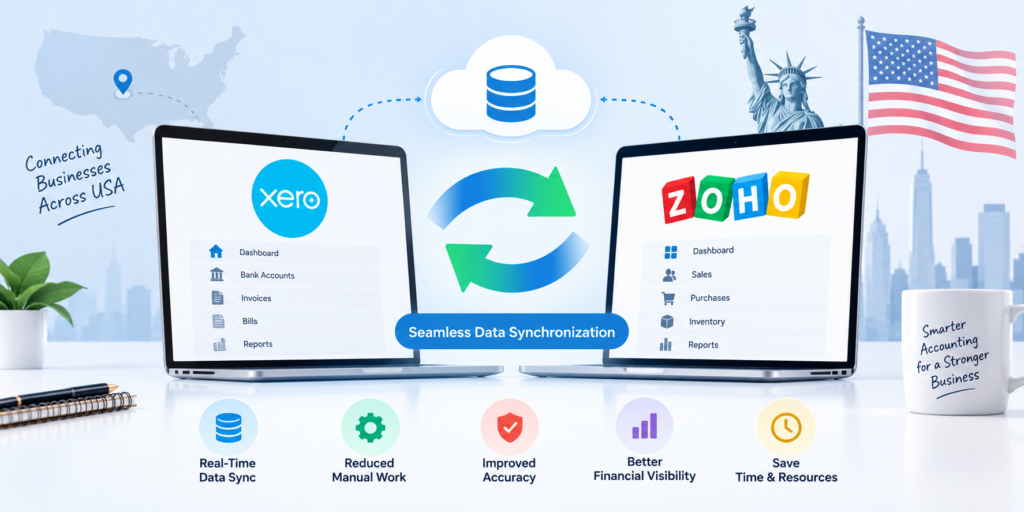
This is where Xero to Zoho Integration Services in USA can make a practical difference. By connecting Xero with the right Zoho applications, businesses can create connected workflows where relevant information moves between systems with less manual intervention. Instead of treating accounting and customer management as separate activities, companies can build a more unified operational process.
For example, when a customer record is created or updated, relevant information can be shared with connected applications. When an invoice is generated, sales and customer-facing teams can have better visibility into its status. Payment information can also support follow-up activities without requiring employees to repeatedly check different systems.
For businesses looking to improve efficiency without replacing every existing application, integration can be a more practical approach. This article explains how Xero to Zoho Integration Services in USA support automated workflows, where they create value, what businesses should consider before implementation, and how Vision Infotech can help.
What Does Xero to Zoho Integration Mean?
Xero is widely used for accounting and financial management, while Zoho provides applications for CRM, sales, automation, customer support, marketing, finance, and business operations.
Xero-to-Zoho integration connects relevant information between these platforms so that businesses can reduce unnecessary manual data entry and create more consistent workflows.
Depending on business requirements, an integration may involve customer information, invoices, payments, products, contacts, financial status, or other relevant records.
The goal is not simply to connect two software platforms. A successful integration should support the way a business actually works.
For example, imagine a small consulting company that manages leads through Zoho CRM and accounting through Xero. Without integration, the finance team may need to manually check customer records, while the sales team may have limited visibility into invoices and payment status.
With Xero to Zoho Integration Services in USA, selected information can move between systems according to predefined business rules. This creates a smoother connection between sales, customer management, and accounting.
How Xero to Zoho Integration Services in USA Automate Workflows
1. Reducing Duplicate Data Entry
One of the most obvious benefits of integration is reducing repetitive data entry.
Without an integrated workflow, an employee may receive a new customer, enter the information into Zoho CRM, and then enter the same information into Xero. If the customer’s company name, email address, billing details, or contact information changes, the employee may have to update multiple systems again.
Xero to Zoho Integration Services in USA can help automate the movement of selected information between connected applications.
This means employees spend less time copying information and more time working on activities that require human judgment.
2. Keeping Customer Information Consistent
Data consistency is important for both customer service and accounting.
Suppose a customer’s billing information is updated by the finance team. If the CRM still contains old information, sales representatives may work with outdated records. This can create confusion and sometimes affect communication with the customer.
A properly designed integration can establish rules for which system owns specific information and when updates should be synchronized.
This is particularly useful for businesses that manage hundreds or thousands of customer records.
3. Automating Invoice-Related Processes
Invoices are often connected to several departments.
The finance team creates and manages invoices, sales teams communicate with customers, and management may monitor outstanding payments. When these activities happen across disconnected platforms, employees may need to exchange information manually.
With Xero to Zoho Integration Services in USA, invoice-related information can become part of connected business workflows.
For example, once an invoice is created in Xero, relevant information can be made available within the appropriate Zoho application. A sales representative may then have better visibility into the customer’s account without asking the finance team for every update.
This can make follow-ups more timely and organized.
4. Supporting Automated Payment Follow-Ups
Payment tracking is another area where automation can be useful.
Consider a customer with an outstanding invoice. In a manual process, an employee might check Xero, identify overdue accounts, open the CRM, find the customer’s contact information, and then create a follow-up task.
An integrated workflow can reduce these repetitive steps.
Depending on the configured business rules, payment or invoice status can trigger a relevant CRM activity, notification, task, or follow-up process.
This does not mean every customer should receive an automatic message. Businesses can define appropriate conditions so that automation supports employees rather than replacing their judgment.
5. Connecting Sales and Finance Teams
Sales and finance often depend on the same customer information but view it from different perspectives.
Sales representatives focus on leads, opportunities, relationships, and revenue opportunities. Finance teams focus on invoices, payments, accounting records, and financial accuracy.
Xero to Zoho Integration Services in USA can help bring these workflows closer together.
For example, a salesperson working on an existing customer account may need to know whether invoices are outstanding before discussing a renewal or additional service. When relevant financial information is available within the appropriate business workflow, the salesperson can have a clearer picture of the customer relationship.
This supports better coordination between departments.
6. Creating Trigger-Based Workflows
Automation becomes more useful when businesses define clear triggers and actions.
A trigger is an event that starts a workflow. An action is what happens after that event.
For example:
Trigger: A new customer is added.
Action: Create or update the corresponding customer record in the connected application.
Another example could be:
Trigger: An invoice reaches an overdue status.
Action: Create a follow-up task for the responsible employee.
The exact workflow depends on the business process, applications involved, and integration capabilities. Good Xero to Zoho Integration Services in USA focus on meaningful automation rather than automating every possible activity.
7. Improving Visibility Across Business Operations
Businesses often struggle not because information is unavailable, but because it is scattered across different systems.
A sales manager may have customer information in Zoho CRM while financial details remain in Xero. A finance manager may have accounting information but limited visibility into sales activities.
Integration can connect relevant information so authorized users can work with a more complete view.
This is one reason companies often work with a Zoho CRM Consultant in USA when planning a connected CRM and accounting environment. A consultant can help identify which information is useful to each team and how it should appear within the workflow.
8. Supporting Better Customer Experiences
Automation should ultimately improve the customer experience.
Customers do not care whether a business uses Xero, Zoho CRM, spreadsheets, or another application. They care about receiving accurate information, timely responses, correct invoices, and professional service.
When systems are disconnected, customers may experience delays because employees have to search across multiple platforms.
With Xero to Zoho Integration Services in USA, businesses can reduce some of these internal delays and provide employees with more relevant information when they need it.
For example, a customer contacting a sales representative about an account issue may receive a faster response when the representative can access the relevant customer and financial context through a connected workflow.
What Types of Businesses Can Benefit?
Integration can be useful across many industries.
Professional service firms can connect customer management with invoicing. Agencies can improve coordination between projects, customers, and payments. Consulting companies can streamline client records and billing workflows. E-commerce and service businesses can also benefit when customer and financial data need to work together.
Small and growing businesses may find integration particularly valuable because employees often handle multiple responsibilities. Reducing repetitive administrative work can give teams more time to focus on customers and revenue-generating activities.
Larger businesses can also benefit, especially when multiple departments work with large volumes of records.
The right approach depends on the organization’s processes rather than its size alone.
How Integration Works With Zoho CRM
Zoho CRM can become an important part of the workflow because it manages customer-facing activities such as leads, contacts, accounts, opportunities, and follow-ups.
When accounting information from Xero is connected appropriately, CRM users can gain better context around customer relationships.
For instance, imagine a software services company with an existing customer considering an additional service. The salesperson can review customer information and relevant financial details before discussing the next opportunity.
This helps sales conversations become more informed.
A Zoho CRM Consultant in USA can also help businesses determine which information should be displayed, synchronized, or used to trigger CRM workflows.
The objective is to avoid unnecessary data movement. Not every accounting field needs to appear in CRM. Integration should focus on information that actually supports business operations.
The Role of Accounting Software Services in USA
Integration is only one part of a successful financial technology strategy.
Businesses also need to consider accounting processes, reporting requirements, financial data quality, user permissions, and workflow design. This is where Accounting Software Services in USA can complement integration projects.
For example, before connecting systems, a company may need to review how customers are named, how invoices are structured, how products are recorded, and how payment statuses are handled.
If the underlying data is inconsistent, automation can simply move incorrect or duplicated information faster.
A professional review can therefore help businesses prepare their accounting environment before implementing advanced automation.
Common Challenges Businesses Should Address
Data Mapping
The same type of information may have different names or structures in different applications. Businesses need clear data mapping rules before synchronization begins.
Duplicate Records
If both systems already contain customer information, integration can create duplicates unless matching and synchronization rules are properly planned.
Workflow Complexity
Trying to automate too many processes at once can make an integration difficult to maintain. Businesses should begin with high-value workflows.
Permissions and Security
Financial information requires careful handling. User permissions and access rules should be considered during implementation.
Error Handling
No automated system should assume that every transaction will always succeed. A good integration strategy should include ways to identify, review, and resolve synchronization errors.
Professional Zoho Consulting services can help businesses address these considerations before and during implementation.
How to Prepare for Xero and Zoho Integration
Before starting Xero to Zoho Integration Services in USA, businesses should document their current processes.
Start by identifying where customer information is created and maintained. Then review how invoices, payments, products, and customer updates are currently handled.
Next, identify repetitive activities.
Ask simple questions:
Which information is entered more than once?
Which tasks require employees to move information between systems?
Where do delays occur?
Which updates are frequently missed?
Which reports require information from multiple applications?
These answers can reveal the best opportunities for automation.
Businesses should also decide which workflows need real-time synchronization and which can operate on scheduled updates.
Why Choose Vision Infotech?
Choosing the right technology partner matters because integration is not simply a technical connection between two applications. It requires an understanding of business processes, data structures, automation, and user requirements.
Vision Infotech helps businesses approach Zoho solutions with a focus on practical business outcomes. Its experience across Zoho-related solutions can help organizations evaluate their existing workflows and identify opportunities for better automation.
A business may need CRM customization, accounting integration, workflow automation, data migration, or broader Zoho implementation support. Each requirement can have different technical and operational considerations.
Vision Infotech can help businesses focus on questions such as:
Which processes should be automated first?
What information should move between Xero and Zoho?
How should customer and financial data be structured?
How can duplicate records be minimized?
Which CRM workflows should respond to accounting events?
How can the solution remain manageable as the business grows?
The value of an experienced implementation partner is not simply connecting applications. It is designing the connection around real business needs.
For companies considering Xero to Zoho Integration Services in USA, this approach can help create workflows that are practical, maintainable, and aligned with long-term operational goals.
What a Well-Designed Integration Can Deliver
A successful integration should make everyday work easier.
Employees should spend less time entering the same information. Sales and finance teams should have better visibility into relevant customer information. Managers should have more reliable operational data. Customers should experience faster and more consistent service.
The strongest results usually come when automation is introduced around clearly defined business processes.
For example, a company might begin by synchronizing customer records, then connect invoice information, and later introduce payment-triggered CRM tasks. This gradual approach allows teams to test each workflow and make improvements before expanding automation.
With well-planned Xero to Zoho Integration Services in USA, businesses can move from disconnected applications toward a more coordinated digital environment.
Conclusion
Xero and Zoho can serve different but complementary roles in a modern business. Xero can manage important accounting activities, while Zoho applications can support CRM, sales, automation, customer engagement, and broader business operations. Connecting them can reduce the gap between financial and customer-facing processes.
Xero to Zoho Integration Services in USA can support automated workflows by reducing duplicate data entry, improving information consistency, connecting sales and finance teams, supporting invoice and payment workflows, and creating trigger-based business processes.
However, successful integration depends on more than technical connectivity. Businesses need clean data, clearly defined workflows, sensible synchronization rules, appropriate security controls, and a strategy that reflects how employees actually work.
For organizations looking to improve their operational efficiency, the right integration can turn disconnected information into a more coordinated workflow. With the support of an experienced partner such as Vision Infotech, businesses can evaluate their current processes, identify meaningful automation opportunities, and build a connected Zoho and Xero environment that supports sustainable business growth.