Getting customers to leave a review feels hard because you have to ask them face to face or by sending an email. Still, nothing happens as people get busy sometimes they forget.
That is where a Google Review Card comes in. It takes customers directly to your review page, so they do not need to search for your business or type anything. Just tap, scan, and leave a review.
This guide explains how a Google Review Card works and why many businesses use it to collect more customer reviews. You will also learn how it fits into modern digital networking tools and helps improve customer engagement.
What Is a Google Review Card?
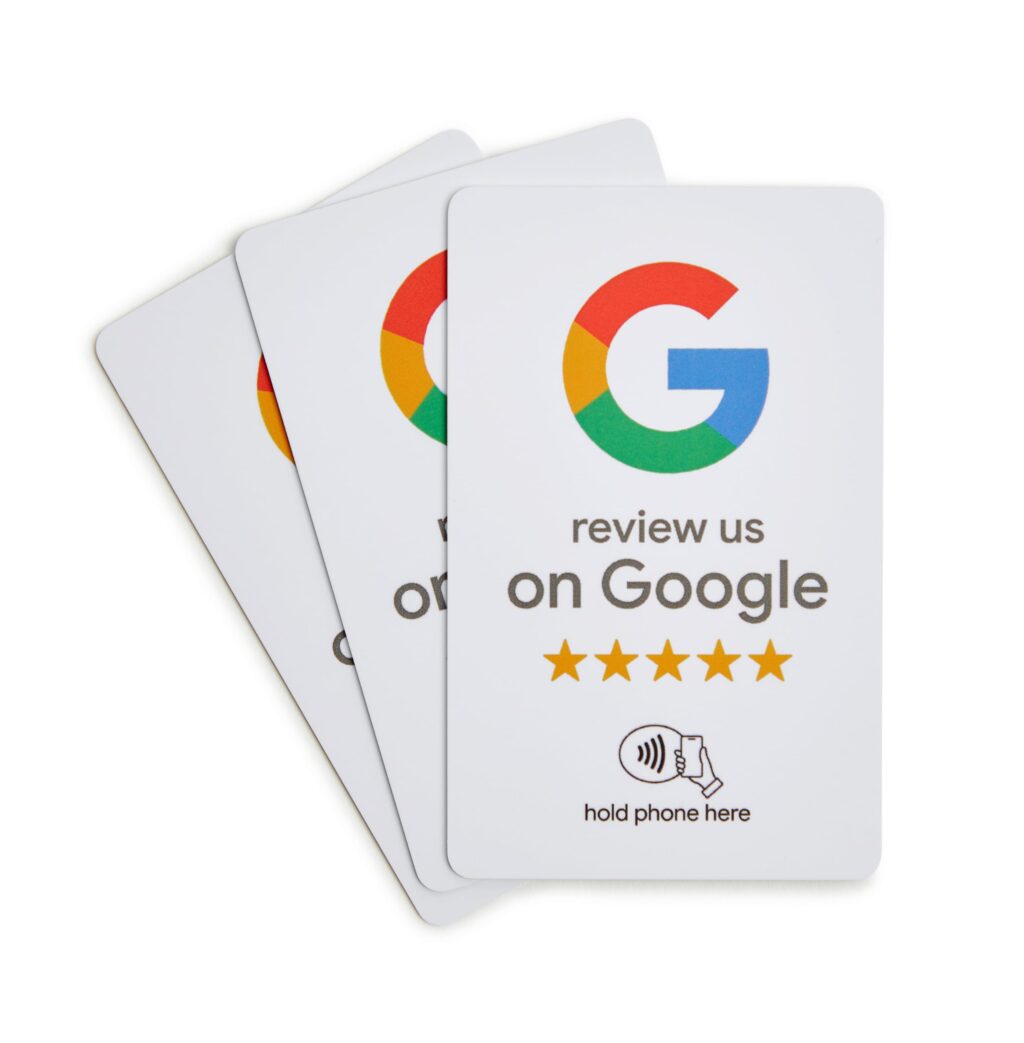
A Google Review Card is a physical or digital card that holds a link or a code. When a customer taps or scans it, they go straight to your Google Maps review form. No extra clicks, no login issues. Just the review box ready for their words.
Many businesses print these cards on paper or plastic. They put them on counters, in bags, or hand them out after a job while others use a digital card version. That means customers scan a code on their phone and land on the review page. Either way, the goal is the same: make reviewing easy.
The problem with most review requests is the number of steps. A customer must open Google, type your name, find the right listing, and then click “write a review.” That takes twenty seconds. But in a busy world, twenty seconds feels long. A Google Review Card cuts that down to five seconds.
Why Customer Reviews Matter for Your Business
Before we talk about the card, let us talk about reviews. Reviews are your online reputation so, when someone searches for your type of business, they see your star rating. A low rating sends them away. A high rating with recent reviews brings them in.
Reviews also help your rank on Google. The more fresh reviews you get, the higher you show up on local search results. That means more eyes on your business without paying for ads.
You cannot force customers to leave reviews, but you can make it easy for them to do so. The simpler the process, the more reviews you are likely to receive. That is why businesses use Google Review Cards. They turn a simple request into quick action.
How a Google Review Card Increases Review Volume
Let us break down the exact ways a Google Review Card gets you more customer reviews.
1. It Removes the Search Step
Many customers are willing to leave a review, but they often do not know where to start. A Google Review Card makes the process simple. By scanning a QR code or tapping the card, customers go directly to your review page. There is no need to search for your business or scroll through multiple listings. They can leave their feedback in just a few clicks.
When you remove the search step, more people finish the task. It is like handing someone a pen instead of asking them to find one. Small change, big result.
2. It Works at the Right Moment
Timing matters for reviews. Ask too late and the customer forgets the details. Ask too early and they have not formed an opinion. The best time is right after a positive moment. That could be when you finish a repair, deliver a meal, or close a sale.
A Google Review Card lets you strike at that moment. Hand the card over with a smile. Say, “If you liked our work, please leave a review here.” The customer holds the card. They see the simple instruction. They are more likely to act because the good feeling is fresh.
3. It Uses Visual and Physical Cues
A card on the counter catches the eye. A digital card shared by text stands out in a message. These cues remind people to act. We are visual creatures. A piece of paper or a code on a screen says, “Do this now.”
Without a card, your request is just words. Words fade. A card stays. The customer puts it in their wallet. They see it later. They scan it then. That delayed action still counts.
4. It Works for All Age Groups
Older customers like physical cards. They know how to hold and read them. Younger customers like digital versions. A digital card works for them. A single Google Review Card can have both a printed link and a code. That covers everyone.
You do not need fancy tech. You just need a card that works. That is why Google Review Cards for business are popular across industries like plumbing, cafes, salons, and shops.
Where to Use Your Google Review Card
You cannot just print cards and hope for the best. You need to put them in the right places. Here are the top spots.
At the Payment Point
Put a stack of cards next to the card machine. When a customer pays, point to the cards. Say, “Before you go, we would love your feedback.” The customer is already holding their phone to pay. They can switch to the camera and scan your card right there.
Inside the Product Bag
For shops that sell physical goods, drop a Google Review Card inside each bag. The customer opens the bag at home. They see the card. They have time to leave a review without feeling watched.
After a Service Call
If you work in a customer’s home or office, hand a card over at the end. Say, “Thank you for your time. A review would help our small team.” Service workers like plumbers, electricians, and cleaners get great results this way.
On Your Digital Channels
Convert your physical card into a digital card. Share that digital card by email, SMS, or on your social channels. This gives online customers the same easy path to your review page.
How to Design an Effective Google Review Card
Design matters. A messy card goes in the bin. A clean card gets used. Follow these simple rules.
Keep the Text Short
Write only what the customer needs. Example: “Scan to review us on Google. Thank you!” That is enough. Do not add your whole story or extra links.
Make the Code Big Enough
If you use a QR code, make it at least two centimetres wide. Test it on different phones. A fuzzy or tiny code frustrates people.
Add a Small Thank You
People like to feel appreciated. Write “Thanks for choosing us” on the card. That small touch increases the chance they will leave a review.
Use Your Brand Colours
Match your logo and shop colours which builds trust. A card that looks like your brand feels official because a random card looks like spam.
What to Say When You Hand Over the Card
Your words matter as much as the card. Do not beg. Do not demand. Just ask with a smile.
Try these simple lines:
- “We are a new business. Your review helps us grow.”
- “If you have a moment, scan this to leave us a star rating.”
- “We love hearing from customers. Use this card to share your experience.”
Keep your tone light. If the customer says no, let it go. Pushy requests create bad reviews.
Tracking Results from Your Google Review Cards
You need to know if your cards work. Without tracking, you guess. With tracking, you improve.
Use a different link or code on each batch of cards. For example, cards at the front desk get one link. Cards in takeaway bags get another link. Then you check your Google account to see how many reviews come from each source.
You can also ask customers how they found your review page. Add a field on your feedback form that says “Did you use our card?” This gives you direct data.
If one location gets few reviews, move the cards to a better spot. If a digital biz card gets more scans, print more of those. Small changes lead to steady growth.
Common Mistakes to Avoid
A Google Review Card only works if you use it right. Avoid these errors.
Mistake 1: Using a Broken Link
Test your link or code every month. Links change. Codes expire. A broken card makes you look unprofessional.
Mistake 2: Forgetting to Ask
Do not just leave cards on the counter. You must tell customers about them. A silent card is an ignored card.
Mistake 3: Asking for Only Five Stars
Never tell a customer what rating to give. That breaks Google’s rules. It can get your reviews removed. Just ask for honest feedback.
Mistake 4: Using Only One Type of Card
Do not rely only on physical cards. Some customers prefer digital while some prefer paper. Use both. A mix of Google Review Cards for business covers all your customers.
How to Get Started Today
You do not need a big budget. You do not need special skills. Here is your action plan.
- Create your unique Google review link. You can get this from your Google Business Profile dashboard.
- Turn that link into a short web address and a QR code. Many free sites do this.
- Design a small card. Put the link, the code, and a thank-you message on it.
- Print ten cards as a test. Or create a digital card version on your phone.
- Hand them to five customers this week. Ask for their review.
- Check your reviews after seven days. See the difference.
Once you see the first new review come in, you will want to print more. That is how it starts. One card, one scan, one review at a time.
Final Thoughts
A Google Review Card is not a fancy tool. It is a simple bridge between your happy customer and your online reputation.
It removes the hard parts of leaving a review. It gives you a way to ask without pressure. And when paired with a digital card, it gives you a modern system that works for every customer.
Stop wishing for more reviews. Start handing out a Google Card today. Your future customers will see those reviews. And they will choose you because of them. That is the real power of this small card.